Text to Handwriting Converter
Looking to transform your regular typed text into natural-looking handwritten notes — no pen required? Our Text to Handwriting tool seamlessly converts your digital text into lifelike handwriting in seconds. Whether you’re preparing assignments, creating study notes, or personalizing letters, this AI-powered handwriting generator gives your text a natural, personal feel.
Try it now: Text to Handwriting — the easiest way to give your digital text a handwritten touch.
Why Use Text to Handwriting?
Typing is quick, but handwritten content stands out. The Text to Handwriting tool transforms your typed words into realistic handwritten text instantly, adding a personal and creative touch with a single click.
Here’s why users love it:
- Natural look: Mimics human handwriting styles for a realistic finish.
- Fast conversion: Convert entire paragraphs within seconds.
- Customizable: Choose handwriting styles, paper backgrounds, and text sizes.
- Download ready: Easily save or print your handwritten notes as an image or PDF.
Looking to go the other way — turning handwriting into editable text? Give our Handwriting to Text tool a try.
How Text to Handwriting Works
You don’t need any special software or technical skills. Just follow these simple steps:
- Type or Paste Your Text — Add your desired text into the editor.
- Select a Handwriting Style — Pick from realistic handwriting fonts.
- Adjust Settings — Change color, line spacing, and paper type if available.
- Generate Handwriting — Let the AI convert your text into a handwriting-style image.
- Download or Share — Save as PNG or PDF for school, work, or creative projects.
Need to create digital documents instead? Try our Image to Word Converter or Image to PDF Converter.
Best Uses of Text to Handwriting
This tool is perfect for:
- Students: Convert typed assignments into handwritten submissions.
- Teachers: Prepare handwritten worksheets or class notes quickly.
- Writers: Give letters, diaries, and journals a human touch.
- Professionals: Personalize thank-you notes or invitations.
Want to extract handwritten notes back into text? Use Handwriting to Text AI to digitize your handwriting effortlessly.
Tips for the Most Realistic Handwriting Look
- Avoid all caps — mixed case text looks more natural.
- Keep sentences short for better flow.
- Try different handwriting fonts to match your purpose.
- Use a lined paper or plain white background for a polished result.
To learn how OCR tools interpret handwriting, read our guide on How to Extract Text from Handwritten Notes Using OCR.
Other Handy Tools on Image to Texts
Explore our other free, browser-based tools to make your digital workflow seamless:
- Image-to-Text Tool – Quickly transform your images into editable text with ease.
- PDF to JPG Converter – Convert your PDFs into editable image files.
- JPG to Excel Converter – Turn tables or handwritten data into spreadsheets.
- Image to Word Converter – Seamlessly convert image files into fully editable Microsoft Word documents, enabling precise text extraction and effortless content modification.
All tools are free, fast, and privacy-friendly — no installation or registration needed.
Final Thoughts
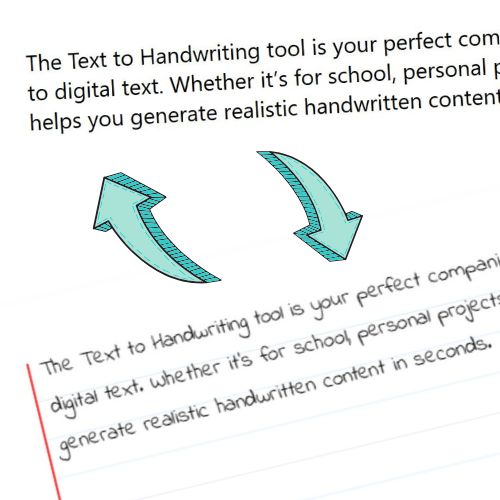
The Text to Handwriting tool is your perfect companion for adding a human touch to digital text. Whether it’s for school, personal projects, or creativity, this tool helps you generate realistic handwritten content in seconds.
Start creating now: Text to Handwriting — because every word looks better in handwriting.
Frequently Asked Questions
1. What is the Text to Handwriting tool?
The Text to Handwriting tool instantly transforms your typed or digital text into natural-looking handwritten content. It helps users create handwritten-style notes, letters, and assignments online without writing manually.
2. Is the Text to Handwriting tool free to use?
Yes! The tool is completely free. You don’t need to register or install any software — it works directly in your browser.
3. Can I download the generated handwritten text?
Yes. After generating your handwriting, you can download it as an image (PNG) or PDF file for printing or sharing.
4. Does this tool support handwriting customization?
Absolutely. You can choose different handwriting styles, paper backgrounds, and font sizes to create a personalized, realistic handwritten look.
5. How does Text-to-Handwriting AI differ from Handwriting-to-Text AI?
The Text to Handwriting tool transforms your typed content into realistic handwritten notes.
Handwriting to Text AI does the opposite — it converts scanned or handwritten notes into editable digital text.
Leave a Reply